> ## Documentation Index
> Fetch the complete documentation index at: https://help.angelliststack.com/llms.txt
> Use this file to discover all available pages before exploring further.
# Recording Security Transfers
It's important to execute the relevant transfer and any purchase agreements before recording the transfer in your cap table. Recording the transfer in the cap table by itself does not effectuate a legal change in ownership.
You can record transfers of securities by navigating to the relevant security and following the applicable transfer workflow described below.
## Recording Share Transfers
Navigate to the Share security that was transferred, and click on **Actions -> Record transfer**.
 Input the relevant details and upload the executed transfer agreement.
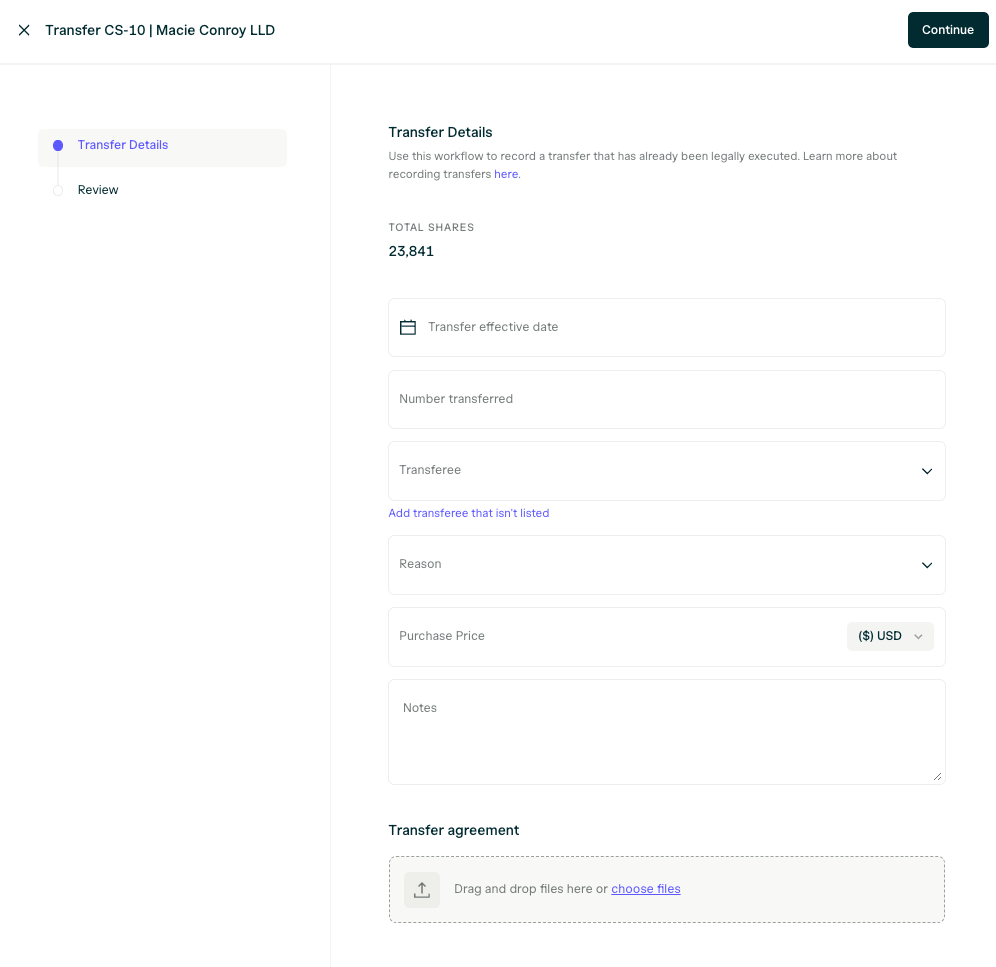 Review the details and complete the transfer recording.
If the transfer is a transfer of less than all of the shares on the original share security, a new balance security will be created for the remainder shares that were not transferred.
The transfer history will be available on the **Transactions** tab of the share security.
The transferee's share security will be generated automatically and will be ready for sharing with the transferee.
## Recording SAFE Transfers
Navigate to the Safe security that was transferred and click on **Actions -> Record transfer**
Review the details and complete the transfer recording.
If the transfer is a transfer of less than all of the shares on the original share security, a new balance security will be created for the remainder shares that were not transferred.
The transfer history will be available on the **Transactions** tab of the share security.
The transferee's share security will be generated automatically and will be ready for sharing with the transferee.
## Recording SAFE Transfers
Navigate to the Safe security that was transferred and click on **Actions -> Record transfer**
 Input the relevant details and upload the executed transfer agreement.
 Review the details and complete the transfer recording.
If the transfer is a transfer of less than all of the the principal amount of the original SAFE, a new balance security will be created for the remainder of the Safe principal balance that was not transferred.
## Recording Transfers of other Security Types
If you need to record a transfer related to a security that is not a Share security or a Safe, please contact [stratups@angellist.com](mailto:stratups@angellist.com) for assistance.
## Where can I view historical transfers?
Transactions (option exercises, share repurchases, share transfers, and conversions) appear in the **Transactions** tab:
Review the details and complete the transfer recording.
If the transfer is a transfer of less than all of the the principal amount of the original SAFE, a new balance security will be created for the remainder of the Safe principal balance that was not transferred.
## Recording Transfers of other Security Types
If you need to record a transfer related to a security that is not a Share security or a Safe, please contact [stratups@angellist.com](mailto:stratups@angellist.com) for assistance.
## Where can I view historical transfers?
Transactions (option exercises, share repurchases, share transfers, and conversions) appear in the **Transactions** tab:
 You may also download various reports that contain repurchase-related information from the **Reports** tab:
